About Your Watch

Please read instructions carefully to understand how to operate your Timex® watch. Your model may not have all of the features described in this booklet.

Features

  • Time with 12- or 24-hour format
  • Date with MM-DD or DD.MM format
  • 3 time zones
  • Optional hourly chime
  • 100-hour chronograph with memory for 30 laps/splits
  • 24-hour countdown timer (count down and stop or repeat)
  • Occasion reminders
  • 3 daily/weekday/weekend alarms with 5-minute backup
  • Customizable mode set (select “HIDE” for unwanted modes – they are removed from the mode sequence)
  • INDIGLO® night-light with NIGHT-MODE® feature

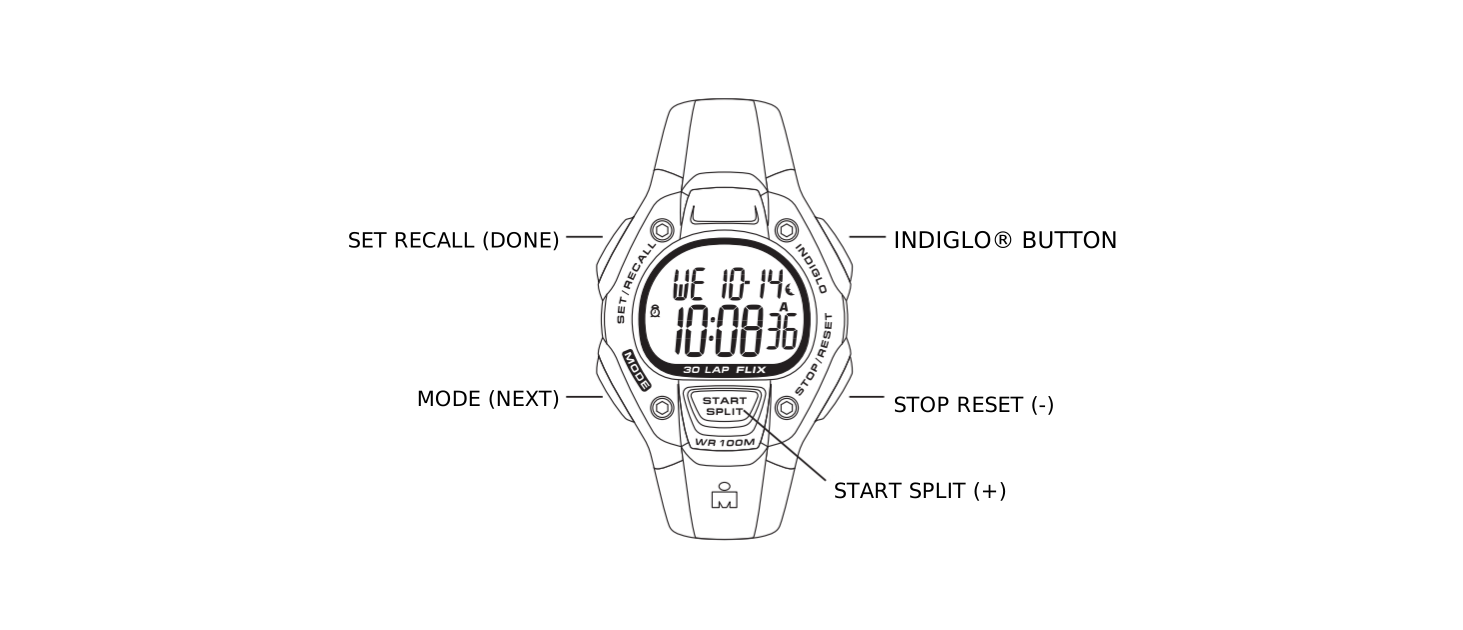
Press MODE repeatedly to step through modes: Chrono, Timer, Occasion, Alarm 1, Alarm 2, and Alarm 3. Press MODE to exit the current mode and return to Time mode.
Basic Operation

Watch case diagram showing SET/RECALL (DONE), MODE (NEXT), INDIGLO button, STOP/RESET (minus), and START/SPLIT (plus) button positions

Button functions shown with secondary functions in parentheses. Watch displays may vary. Button operations are the same.

Time

To set time, date, and options:

  1. With time and date showing, press and hold SET·RECALL.
  2. Current time zone (1, 2, or 3) flashes. Press + or – to select the time zone to set, if desired.
  3. Press NEXT. Hour flashes. Press + or – to change the hour (including AM/PM); hold the button to scan values.
  4. Press NEXT. Minutes flash. Press + or – to change minutes.
  5. Press NEXT. Seconds flash. Press + or – to set seconds to zero.
  6. Press NEXT. Month flashes. Press + or – to change month.
  7. Press NEXT. Day flashes. Press + or – to change day.
  8. Press NEXT. Year flashes. Press + or – to change year.
  9. Press NEXT to set options. Press + or – to change a value, then press NEXT to go to the next option. Press DONE at any step to exit and save settings. Available options are 12- or 24-hour time format, MM-DD or DD.MM date format, hourly chime beep for button presses, and mode customization set (select “HIDE” for unwanted modes – they are removed from the mode sequence). If you hide a mode, you can turn it back on later using the procedure above.

Press START·SPLIT once and hold to see the 2nd time zone. Press START·SPLIT twice and hold to see the third time zone. Continue holding the button for 4 seconds to switch to the displayed time zone.

Press and hold STOP·RESET to see the next upcoming occasion (see the description of Occasion mode). Release and immediately press and hold again to see subsequent occasions.

Chronograph

This mode provides a chronograph (stopwatch) function. Press MODE to go to Chrono mode.

To start, press START·SPLIT. The chronograph counts up by hundredths of a second up to one hour, then by seconds up to 100 hours. A stopwatch icon flashes to indicate the chronograph is running.

To stop, press STOP·RESET. The stopwatch icon freezes to indicate the chronograph is stopped.

To resume, press START·SPLIT, or to reset (clear) the chronograph, press and hold STOP·RESET. When the chronograph is already running, it continues to run if you exit the mode. The stopwatch icon appears in Time mode.

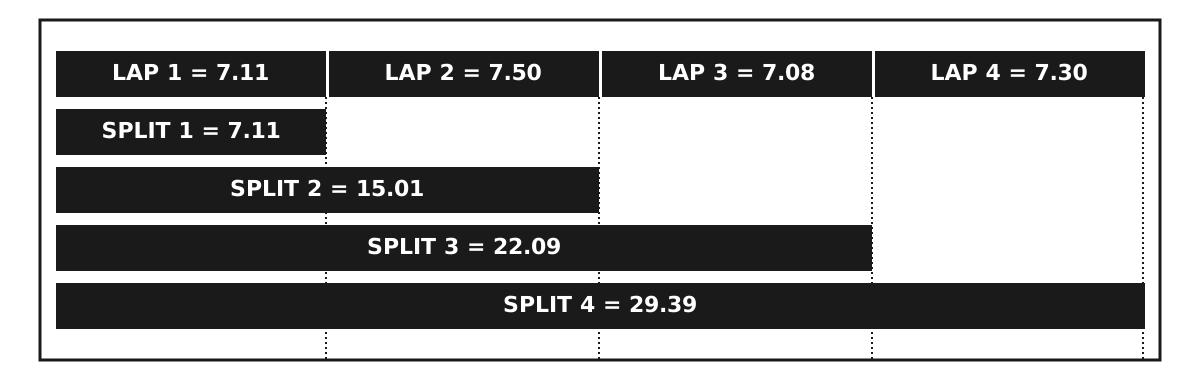
While the chronograph is running, press START·SPLIT to take a split. Lap and split times will be displayed with the lap number. Lap and split times are stored in memory until a new workout is started (chronograph started from zero).

Diagram showing four laps (LAP 1 = 7.11, LAP 2 = 7.50, LAP 3 = 7.08, LAP 4 = 7.30) and their cumulative splits (SPLIT 1 = 7.11, SPLIT 2 = 15.01, SPLIT 3 = 22.09, SPLIT 4 = 29.39)

To recall split times during or after a workout, press SET·RECALL. Then press + or – to step through splits. Press DONE to exit.

To set the display format, press SET·RECALL while the chronograph is reset. Then press + or – to select the desired format. Press DONE to exit.

Timer

Timer mode provides a countdown timer with alert. Press MODE repeatedly until TIMER appears.

To set countdown time:

  1. Press SET·RECALL. Hours flash. Press + or – to change hours; hold the button to scan values.
  2. Press NEXT. Minutes flash. Press + or – to change minutes.
  3. Press NEXT. Seconds flash. Press + or – to change seconds.
  4. Press NEXT. The action at the end of the countdown flashes. Press + or – to select STOP or REPEAT, indicated by an hourglass icon with an arrow.
  5. Press DONE at any step when done setting.

To start the timer, press START·SPLIT. The timer counts down every second from the countdown time. An hourglass icon flashes to indicate the timer is running.

To pause the countdown, press STOP·RESET. The hourglass icon freezes to indicate the timer is stopped.

To resume the countdown, press START·SPLIT, or to reset the countdown, press STOP·RESET.

The watch beeps and the night-light flashes when the countdown ends (timer reaches zero). Press any button to silence. If REPEAT AT END was selected, the timer repeats the countdown indefinitely.

The timer continues to run if you exit the mode. An hourglass icon appears in Time mode.

Occasion

Occasion mode allows you to set reminders for occasions, like birthdays, anniversaries, holidays, and appointments. Press MODE repeatedly until OCCASN appears.

Today’s date is shown with today’s occasion in the top line. Press START·SPLIT or STOP·RESET to move forward or backward through dates, respectively. The occasion for the displayed date is always shown. Non-recurring occasions may be set for dates up to one year in advance.

To set an occasion:

  1. Press START·SPLIT or STOP·RESET to select the desired date; hold the button to scan dates.
  2. Press SET·RECALL. Occasion flashes; if no occasion is selected, then NONE flashes. Press + or – to change the occasion. ANNIV, BDAY, BILL-YR, and HOLI-YR repeat yearly, and BILL-MO repeats monthly.
  3. To set occasions for other dates, press NEXT. Date flashes. Press + or – to change the date; hold the button to scan values. The occasion for the displayed date is always shown.
  4. Press NEXT to set the occasion for the displayed date, as in step 2.
  5. Press DONE at any step when done setting.

Occasion Reminders

The watch alerts you of occasions at 8:00 AM on the day of the occasion. You may choose to receive no alert, or an alert at a different time or day. You may choose different alerting for each occasion type — e.g., all birthdays may alert one day prior, while all holidays may have no alert.

To set occasion reminder alerts:

  1. Go to today’s date by pressing START·SPLIT or STOP·RESET to scan dates. You may also go to today’s date by simply entering Occasion mode.
  2. From today’s date, press STOP·RESET to go to ALERT SETUP.
  3. Press SET·RECALL. Occasion type flashes. Press + or – to select the occasion type. Your settings will affect all occasions of the selected type.
  4. Press NEXT. Alert status (ON/OFF) flashes. Press + or – to turn the alert on or off for the selected occasion type. If OFF is selected, the next 4 steps are skipped.
  5. Press NEXT. Alert time hour flashes. Press + or – to change the hour; hold the button to scan values.
  6. Press NEXT. Alert time minutes flash. Press + or – to change minutes.
  7. Press NEXT. AM/PM flashes if in 12-hour time format. Press + or – to change.
  8. Press NEXT. Alert day flashes. Press + or – to set the alert for 0–9 days prior to the occasion.
  9. To set alerts for other occasion types, press NEXT. Occasion type flashes. Select the occasion type as in step 3 and continue with the setting procedure.
  10. Press DONE at any step when done setting.

A hand icon appears when the displayed occasion type has a reminder alert. When an alert sounds in Time mode, the hand icon flashes. Press any button to silence. See Time mode for instructions on viewing upcoming occasions.

Alarm

The watch has three alarms. Press MODE repeatedly until ALM 1, ALM 2, or ALM 3 appears.

To set the alarm:

  1. Press SET·RECALL. Hour flashes. Press + or – to change the hour; hold the button to scan values.
  2. Press NEXT. Minutes flash. Press + or – to change minutes.
  3. Press NEXT. AM/PM flashes if in 12-hour time format. Press + or – to change.
  4. Press NEXT. Alarm day setting flashes. Press + or – to select DAILY, WKDAYS, or WKENDS.
  5. Press DONE at any step when done setting.

To turn the alarm on/off, press START·SPLIT. An alarm clock icon appears when the alarm is on in this mode and in Time mode.

When the alarm sounds, the night-light flashes. Press any button to silence. If no button is pressed, the alarm will sound for 20 seconds and repeat once five minutes later. Each of the three alarms has a different alert melody.

INDIGLO® Night-Light with NIGHT-MODE® Feature

Press the INDIGLO® button to illuminate the watch display for 2–3 seconds (5–6 seconds while setting). Electroluminescent technology used in the INDIGLO® night-light illuminates the entire watch face at night and in low light conditions. Any button pressed while the INDIGLO® night-light is on keeps it on.

Press and hold the INDIGLO® button for 4 seconds to activate the NIGHT-MODE® feature. A moon icon will appear in Time mode. This feature causes any button press to activate the INDIGLO® night-light for 3 seconds. The NIGHT-MODE® feature may be deactivated by pressing and holding the INDIGLO® button again for 4 seconds, or it automatically deactivates after 8 hours.

Water and Shock Resistance

If your watch is water-resistant, meter marking or ( Water resistance wave mark ) is indicated.

Water-Resistance Depth p.s.i.a.* Water Pressure Below Surface
30m/98ft60
50m/164ft86
100m/328ft160

*pounds per square inch absolute

  1. Watch is water-resistant only as long as lens, push buttons and case remain intact.
  2. Watch is not a diver watch and should not be used for diving.
  3. Rinse watch with fresh water after exposure to salt water.
  4. Shock-resistance will be indicated on the watch face or caseback. Watches are designed to pass ISO test for shock-resistance. However, care should be taken to avoid damaging the crystal/lens.

Battery

The watch button cell or coin battery is not intended to be replaced by a consumer. Only a jeweler or other professional is to replace the battery.