
Thank you for purchasing your Timex® watch. Please read instructions carefully to understand how to operate your Timex® watch. Your model may not have all of the features described in this booklet.
About Your Watch
Basic Operations
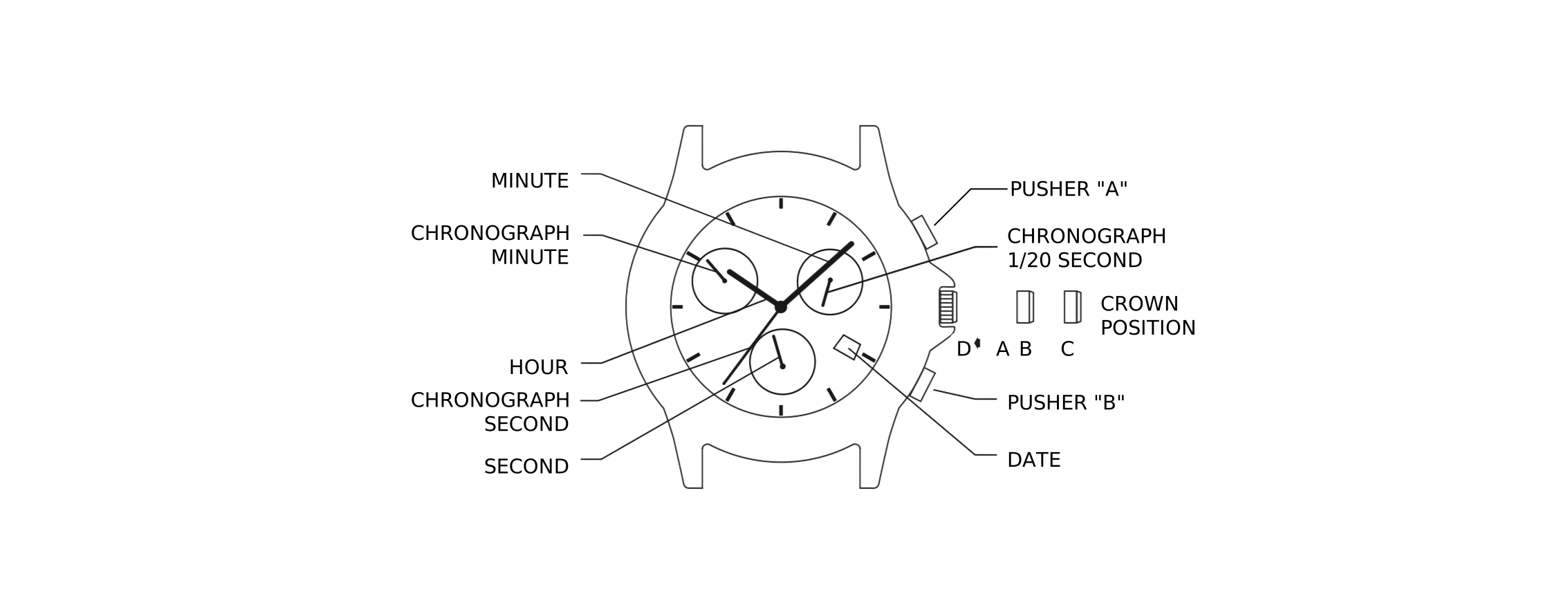
- 6 o’clock eye shows seconds.
- 10 o’clock eye shows “minutes elapsed” for chronograph.
- 2 o’clock eye shows “1/20 seconds elapsed” for chronograph.
- Chronograph second hand shows “seconds elapsed” for chronograph.
Time and Calendar
Time
To Set the Time
- Pull crown out to “C” position.
- Turn crown either way to correct time.
- Push crown in to “A” position.
To Adjust to a New Time Zone
- Pull crown out to “B” position.
- Turn crown either way to move the hour hand in hour increments.
Calendar
To Set the Calendar
- Pull crown out to “B” position.
- Turn crown either way to move hour hand. Two complete revolutions relative to the 12 o’clock position will move the date forward or backward. This will correct both date and 24-hour time.
- Push crown in to “A” position.
Chronograph
The chronograph is capable of measuring:
- 1/20 seconds elapsed up to 1 second (2 o’clock eye).
- Seconds elapsed up to 1 minute (chronograph second hand).
- Minutes elapsed up to 30 minutes (10 o’clock eye).
To Adjust Chronograph Hands
Before using the chronograph, adjust all the chronograph hands to the “0” or 12-hour positions.
- Pull crown out to “B” position.
- Press pusher “B” until the hand at the 10 o’clock eye resets to the “30” position.
- Pull crown out to “C” position.
- Press pusher “A” until the chronograph second hand resets to the “0” or “60” or 12-hour position.
- Press pusher “B” until the hand at the 2 o’clock eye resets to the “0” position.
- Push in crown to “A” position.
Standard Chronograph Measurement
- Press pusher “A” to start timing.
- Press pusher “A” to stop timing.
- Press pusher “B” to reset.
Split Time Measurement
- Press pusher “A” to start timing.
- Press pusher “B” to split.
- Press pusher “B” to resume timing.
- Press pusher “A” to stop timing.
- Press pusher “B” to reset.
INDIGLO® Night-Light and NIGHT-MODE® Feature
INDIGLO® Night-Light
With the crown in the “A” position, push crown to the “D” position. Entire dial will be illuminated. Electroluminescent technology used in INDIGLO® night-light illuminates entire watch face at night and in low light conditions.
NIGHT-MODE® Feature
To use NIGHT-MODE® Feature:
- Push and hold crown to “D” position for 4 seconds to activate NIGHT-MODE® feature. Pressing any pusher will cause the INDIGLO® night-light to stay on for 3 seconds.
- NIGHT-MODE® feature will last for 8 hours.
- Or push and hold crown to “D” position for 4 seconds to deactivate NIGHT-MODE® feature.
Water Resistance
If your watch is water-resistant, meter marking or ( ) is indicated.
| Water-Resistance Depth | p.s.i.a.* Water Pressure Below Surface |
|---|---|
| 30m/98ft | 60 |
| 50m/164ft | 86 |
| 100m/328ft | 160 |
*pounds per square inch absolute
Bracelet Adjustment
Bracelet Link Removal
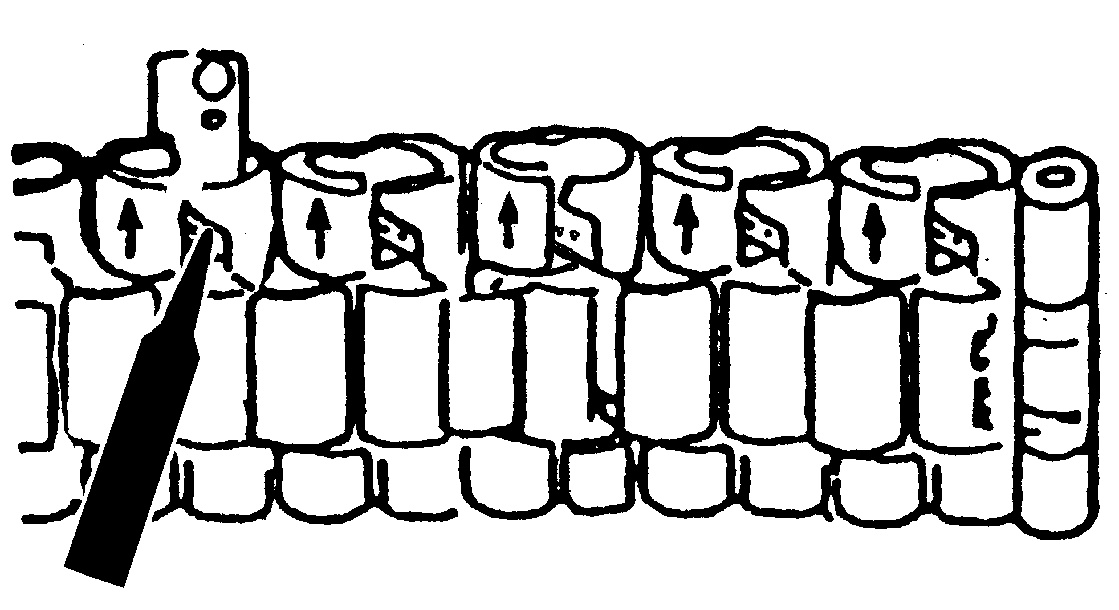
Removing Links
Place bracelet upright and insert pointed tool in opening of link. Push pin forcefully in direction of arrow until link is detached (pins are designed to be difficult to remove). Repeat until desired number of links are removed.
Re-Assembly
Rejoin bracelet parts. Push pin back into link in opposite direction of arrow. Press pin down securely into bracelet until it is flush.
Solid Link Bracelet
Removing Links
Using a very small screwdriver, remove screws by turning counterclockwise. Repeat until desired number of links are removed. Do not remove links adjacent to clasp.
Re-Assembly
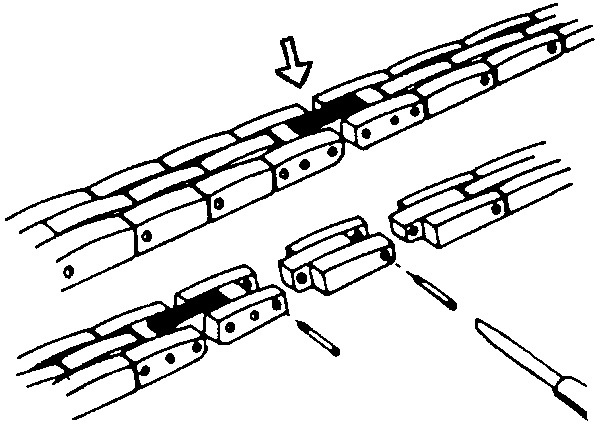
Rejoin bracelet parts and insert screw in end of opening where it was removed. Turn screw clockwise until tight and flush with bracelet.
Battery
The watch button cell or coin battery is not intended to be replaced by a consumer. Only a jeweler or other professional is to replace the battery.
Slide-Rule Bezel Function
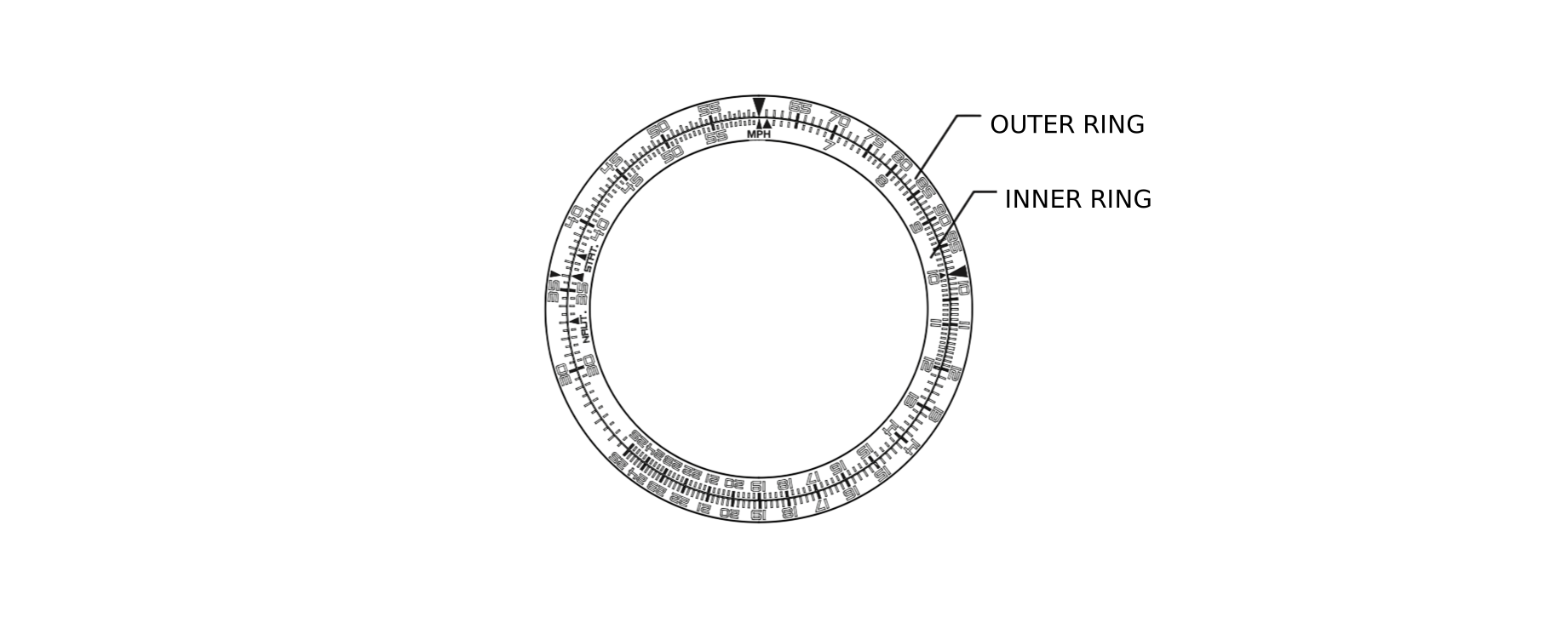
The slide rule function of the top ring operates by rotating the outer ring. The inner ring does not move. The outer ring is always related to “distance” or “speed”, or any data that varies with time. The inner ring only notes units of time.
Outer Ring
On the outer ring, the figure “10” represents factors or multiples of 10, such as 0.1, 1.0, 10, or 100.
Inner Ring
On the inner ring, “MPH” (mile per hour) refers to “speed index”. This index is used to calculate the speed involving any data per hour. On the inner ring, “STAT” (statute miles) and “NAUT” (nautical miles) are for conversion of distance units.
The following examples serve as a guide of how to use the slide rule.
Speed Calculation
What speed is required to go 10 nautical miles in 15 minutes?
Known Factors: Distance: 10 nautical miles. Time: 15 minutes.
- Align “10” arrow on the outer ring with “15” on the inner ring.
- The speed required can be found directly above the “MPH” marking on the inner ring.
The answer: 40 nautical miles per hour.
Time Calculation
How long will it take to go 10 nautical miles at a speed of 40 miles per hour?
Known Factors: Speed: 40 miles per hour. Distance: 10 nautical miles.
- Align “40” on the outer ring with the mark “MPH” on the inner ring.
- The time required can be found directly below the “10” arrow on the outer ring, which is “15” on the inner ring.
The answer: 15 minutes.
Distance Calculation
How far can you travel at 40 miles per hour for 15 minutes?
Known Factors: Speed: 40 nautical miles per hour. Time: 15 minutes.
- Align “40” on the outer ring directly above the mark “MPH” on the inner ring.
- The distance travelled can be obtained above the “15” marker on the inner ring. The number indicated on the outer ring is “10”.
The answer: the distance travelled is 10 nautical miles.
Unit Conversion
To convert distance from nautical miles to statute miles and kilometers.
Known Factor: Distance to convert is 10 nautical miles.
- Align the “10” arrow on the outer ring above the “NAUT” on the inner ring. The conversion in statute miles (11.5) is found above the inner ring “STAT” marking, and the conversion to kilometers (18.5) is found above the inner ring “MPH” marking.